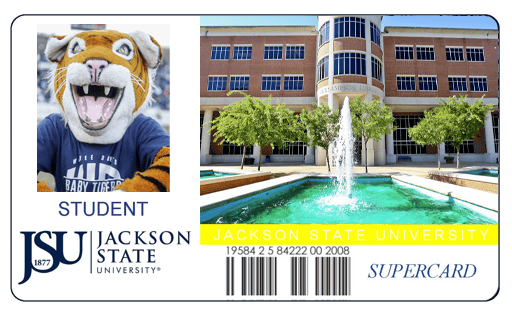
JSU™ Supercard

JSU™ Supercard FAQs
Want to learn more about the JSU Supercard? We have answered some questions in our Frequently Asked Questions section below that should help! If you would like additional information, please do not hesitate to contact us (information provided below).
JSU SUPERCARD FAQ
Q. How to become a JSU Supercard Merchant?
A. Contact or visit the Department of Contractual Services on the 3rd floor of the Jacob L. Reddix Hall, Room 321 , or call 601-979-1065 and request a Supercard Overview Letter.
Application. Interested merchants may also visit http://supercard.jsums.edu.
Q. How are merchants informed of the application status?
A. The University will notify the merchant within ten (10) business days from the date the application is received in the Department of Contractual Services.
Q. Are interested merchants guaranteed acceptance into the Supercard Merchant Program?
A. No. Interested merchants are welcome to apply; however, it does not guarantee acceptance into the Supercard Merchant Program.
Q. How do merchants receive fund settlements from JSU™ Supercard transactions, and how often?
A. Through the newly adopted Off-Campus Advantage network, merchants receive electronic fund settlements daily, with less commission and processing fees.
Q. How are merchants selected to accept the JSU™ Supercard?
A. In most cases, establishments are considered on an “as needed” and “desired basis” for any particular goods and services offered by the merchant.
Q. When are new merchants accepted into the JSU™ Supercard Program?
A. New off-campus merchants are accepted into the program at the beginning of the Fall & Spring semesters. Interested merchants are welcome to apply at any time. Applications are reviewed upon receipt, and based on that review, a correspondence is mailed to the interested merchant.
Q. I would like to recommend a merchant to the JSU Supercard?
A. The Department of Contractual Services welcomes any comments, suggestions, and recommendations for new merchants.
Q. I would like to activate my card account and deposit funds?
A. Faculty, staff, and students are welcome to apply for a card account by visiting and making an application in Jacob L. Reddix Hall, Room 321. Individuals can deposit funds into their Supercard account by visiting the Office of Financial Services on the 2nd Floor of the B.F. Roberts building at the cashier’s station. Limited restrictions apply to employees who are employed for less than six (6) months.
Q. Where should I go to obtain a summary of my account balance, transactions, etc?
A. Step-by-Step Guide to Access JSU GET
To ensure the privacy and safety of card account information, account balances are not given over the telephone.
Q. Can I deposit funds into my Supercard account online?
A. Students are allowed to transfer Federal Financial Aid funds onto their card account. The students establish access through the Personal Access to Web Services (P.A.W.S) and follow the instructions.
Q. Who is responsible for charges not authorized by the cardholder?
A. The cardholder is responsible for all charges. Should the card become damaged, lost, or misplaced either accidently or by theft, the University assumes no responsibility for unauthorized withdrawals from the customer’s account. The GET App enables you to deactivate a lost or stolen card at any time of day or night. It is the sole responsibility of the cardholder to ensure their JSU Supercard is secured at all times. In addition, it is the sole responsibility of the cardholder to report suspicious card activity to Campus Police immediately at 601-979-2580.
Q. How to care for the JSU Identification/Supercard?
A.
- Protect the card from physical abuse.
- Carry a Supercard in a protective cover such as a wallet.
- Do not use Supercard as a tool or punch holes in it.
- Do not give the Supercard to someone else to use.
- Do not try to alter the Supercard.
- Do not place Supercard on stereos, microwaves, or next to other credit cards.
- Avoid running Supercard through a washer or dryer.
- Lost Supercard should be reported to the following:
Campus Safety Monday-Friday from 8 am -5 pm and/or to Campus Police, Monday-Friday from 8 am to 5 pm or by calling 601-979-2580.
Q. Why can’t I log into the GET App yet?
A. Access to the GET App is triggered by the creation of your physical ID card. If you haven’t visited the ID Center to get your card printed, the system will not recognize your credentials. Once your card is printed, your data will sync, and you can log in using your J Number and NetID password.
Q. I’m a new student; can I upload my photo through the app before I arrive?
A. No. New students must have their initial ID photo taken in person at the ID Center. The “Photo Submission” feature in the GET App is currently only available for existing students, faculty, and staff who already have a card and wish to update their current photo.
Q. How long does it take for the app to work after I get my card?
A. In most cases, the sync happens shortly after your card is printed. However, we recommend waiting up to 24 hours for all systems to fully update before attempting your first login.
Q. What credentials do I use to log in?
A. You will use your official university credentials:
-
Username: Your J Number
-
Password: Your NetID Password
Q. What if I still can’t log in after getting my physical card?
A. If it has been more than 24 hours since your card was issued and you still cannot access the app, please contact the Department of Contractual Services at (601) 979-1065 or email contractual.services@jsums.edu for assistance.
JSU™ Supercard | GET
Jackson State University faculty, staff and
students can now use GET to manage
their JSU Supercard accounts. Find out more about the GET application by clicking “Learn More” below.